Jul 25, 2025
TapeStation 4150: DNA Electrophoresis
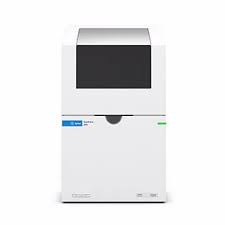
- 1Saint Mary's University



Protocol Citation: Sonya N. Radvan, Tim Frasier 2025. TapeStation 4150: DNA Electrophoresis. protocols.io https://dx.doi.org/10.17504/protocols.io.q26g7nbj3lwz/v1
License: This is an open access protocol distributed under the terms of the Creative Commons Attribution License, which permits unrestricted use, distribution, and reproduction in any medium, provided the original author and source are credited
Protocol status: Working
We use this protocol and it's working
Created: July 18, 2025
Last Modified: July 25, 2025
Protocol Integer ID: 222779
Keywords: TapeStation, Agilent, electrophoresis, DNA quantification, 10µl for the genomic kit, genomic dna kit, genomic kit, d1000 kit, dna quality of dead whale, dna quality, d1000, dna electrophoresi, dna integrity number, dna, kit, known poor quality sample, mitochondrial sequencing, tapestation, poor quality sample, sequencing, 10µl
Abstract
The two kits we will generally be using with the TapeStation 4150 are the D1000 kit and the Genomic DNA kit. The D1000 kit has a sizing range of 35 to 1000 bp and a quantitative range of 0.1-50 ng/µL. The Genomic DNA kit has a sizing range of 200 to >60000 bp, a quantitative range of 10-100 ng/µL, and a DIN (DNA Integrity Number) functional range of 5-300 ng/µL. The protocol between these two kits is very similar, with only the volume of buffer needed for each sample changing (3µL for the D1000 and 10µL for the genomic kit).
The D1000 kit should be used for visualizing amplified products of a specific size range (NGS libraries, sexing, mitochondrial sequencing, etc.) and the genomic kit should be used post extraction for assessing the DNA quality of dead whale or known poor quality samples.
Guidelines
All kits should be stored in the refrigerator at 4°C and have a shelf stability life of ~6 months. If accurate quantification is needed, DNA may need to be diluted to fall within the quantification range of each kit before being run on the TapeStation. If dilution is required, a separate dilution should be made - stock DNA tubes should never be diluted.
If an error or problem with the TapeStation is ever detected, service is needed, or you have general inquiries you can call 1-800-227-9770. You can also reach out for technical support by visiting www.agilent.com/chem/contactus.
Materials
| Reagent | Supplier | Catalogue Number | |
| D1000 Reagents | Agilent Technologies | 5067-5583 | |
| D1000 Ladder | Agilent Technologies | 5067-5586 | |
| D1000 Sample Buffer | Agilent Technologies | 5067-5602 | |
| D1000 ScreenTape | Agilent Technologies | 5067-5582 | |
| Genomic DNA Reagents | Agilent Technologies | 5067-5366 | |
| Genomic DNA ScreenTape | Agilent Technologies | 5067-5365 | |
| Optical tube strip caps (x8) | Agilent Technologies | 401425 | |
| Optical tube strips (x8) | Agilent Technologies | 401428 | |
| Loading tips, 1 Pk | Agilent Technologies | 5067-5598 | |
| Loading tips, 10 Pk | Agilent Technologies | 5067-5599 |
Safety warnings
Toxic agents - refer to product MSDS for further information. Always wear appropriate lab PPE such as gloves and a lab coat and take care while completing this protocol.
Damage to TapeStation systems - Only use the recommended consumables and reagents with the TapeStation.
Before start
This protocol mainly follows and is adapted from the D1000 ScreenTape Assay Quick Guide [1] and the Genomic DNA ScreenTape Assay Quick Guide [2].
Preparation
Remove kit reagents and ScreenTape from refrigerator and allow to come to room temperature for 00:30:00 minutes. If DNA is frozen, remove from freezer and allow to thaw at room temperature.
Log into the laptop connected to the TapeStation (SMU log in), turn on the TapeStation, and launch the TapeStation Controller software.
Open the TapeStation hood. Flick the ScreenTape device and insert it into the ScreenTape nest of the TapeStation instrument. The software background should change colour and display the name of the assay/ScreenTape type inserted.
Select the number and position of samples in the Controller software. Type the name of the samples in each position on the right side of the screen.
Note that for the D1000 kit you can run all 16 lanes with samples and use the electronic ladder. To use the electronic ladder, right click on the A1 position and select "electronic ladder". The Genomic DNA ScreenTape can run 15 samples and a ladder must be run.
Check consumables. The required consumables (tips, further ScreenTape devices) are displayed in the TapeStation Controller software. Check that you have enough before moving forward.
Vortex reagents briefly and mix DNA samples well. Spin reagents and DNA down before use.
Prepare tubes and caps. Boxes of Optical tube strips (x8) and Optical cap strips (x8) are stored in the TapeStation drawer. Pull out the number of tubes and caps needed and place in a PCR tube rack. Label the tops and sides of the tubes with the sample IDs. It's important to label the sides because once the caps are removed it can be easy to lose track of which side is A1 vs H1 or A2 vs H2.
Reaction Setup
Prepare ladder.
D1000 Kit. If not using the electronic ladder, place 3 µL of Sample Buffer and 1 µL of ladder at position 1A in the tube strip.
If using 2 screen tapes, you can reuse the same tube for the ladder and place 6 µL of sample buffer and 2 µL of ladder into the tube.
Genomic DNA Kit. Place 10 µL of Sample Buffer and 1 µL of ladder at position 1A in the tube strip.
If using 2 screen tapes, you can reuse the same tube for the ladder and place 20 µL of sample buffer and 2 µL of ladder into the tube.
Prepare samples.
D1000 Kit. For each sample, pipette 3 µL of Sample Buffer and 1 µL of DNA sample into the designated tube. Apply caps to the tube strips ensuring the labels on the top match the labels on the side.
Genomic DNA Kit. For each sample, pipette 10 µL of Sample Buffer and 1 µL of DNA sample into the designated tube. Apply caps to the tube strips ensuring the labels on the top match the labels on the side.
Mix liquids. Mix the samples by placing the strips in the IKA MS3 vortexer at 2000 rpm for 00:01:00 minute (the vortexer is automatically set to run for 1 minute by pressing start).
Spin down samples and ladder for 00:00:15 seconds.
Sample Analysis
Load samples into the TapeStation instrument. Place the ladder (or first sample if using the electronic ladder) in position A1.
Carefully remove the caps from the tube strips and visually confirm that all the liquid remains in the bottom. If liquid has moved up any of the tubes, replace the caps and spin the strip again.
Remove the lid from the tip box and close the TapeStation lid.
Click Start on the Controller software.
The software will display how much time is left in the run. A full 16 samples for the D1000 DNA kit takes <20 minutes and a full 15 samples for the Genomic DNA kit takes <25 minutes. Once it is complete, the TapeStation Analysis will automatically open and display the results.
In the TapeStation Analysis software you can alter the contrast of the gel image, see concentrations for certain basepair ranges, detect DNA quality (Genomics kit), etc.
The results are automatically saved into the C drive under the TapeStation folder. The file name is the date and time of the run. If you wish to save a PDF report, go to file and click "Create Report". There you can select what samples, tables, and electropherograms you would like to include in the report.
If a Genomic DNA assay was run, the date of the run/file name should be added to the DNA table in the MySQL database for each sample that was run.
Protocol references
[1] Agilent D1000 ScreenTape Quick Guide for TapeStation Systems, Agilent Technologies Inc. Germany, 2021. Accessed: 13 Mar, 2022. [Online]. Available: https://www.agilent.com/cs/library/usermanuals/public/D1000_QuickGuide.pdf
[2] Agilent Genomic DNA ScreenTape Quick Guide for TapeStation Systems, Agilent Technologies Inc. Germany, 2021. Accessed: 06 Apr, 2021. [Online]. Available: https://www.agilent.com/cs/library/usermanuals/public/gDNA_QuickGuide.pdf