Jun 09, 2025
Structural MRI Using the University of Washington 14T Vertical Bore Bruker MRI
- 1Allen Institute for Neural Dynamics
- Allen Institute for Neural Dynamics



Protocol Citation: Yoni Browning, Galen Lynch, Josh Siegle 2025. Structural MRI Using the University of Washington 14T Vertical Bore Bruker MRI. protocols.io https://dx.doi.org/10.17504/protocols.io.3byl4j8p2lo5/v1
License: This is an open access protocol distributed under the terms of the Creative Commons Attribution License, which permits unrestricted use, distribution, and reproduction in any medium, provided the original author and source are credited
Protocol status: Working
We use this protocol and it's working
Created: March 26, 2023
Last Modified: June 09, 2025
Protocol Integer ID: 79441
Keywords: Magnetic Resonance Imaging, Electrophysiology, Neuroscience, vertical bore bruker mri, structural mri, using skull landmark, structural scan, skull landmark, acute electrophysiology recordings in head, targeting acute electrophysiology recording, fixed mice
Abstract
This protocol describes the process of obtaining pre-insertion MRI images using the University of Washington 14T vertical bore Bruker MRI. These structural scans allow for precisely targeting acute electrophysiology recordings in head-fixed mice beyond what is possible using skull landmarks alone.
Guidelines
Only perform this procedure in accordance with IACUC and veterinary requirements.
Materials
To Prep Headframe:
For preparing Manganese Injectable:
Manganese(II) chloride tetrahydrateMerck MilliporeSigma (Sigma-Aldrich)Catalog #M3634
BICINEMerck MilliporeSigma (Sigma-Aldrich)Catalog #B8660
BicineFisher ScientificCatalog #BP26461
NaOH
Lactated Ringers Injection, USP, Preservative-Free, BaxterHenry Schein Animal HealthCatalog #059380 (or similar)
Apera pH Calibration Buffer Solution KitAmazonCatalog #B01N0QVLLD
Syringe Filters (e.g.):
Equipment
Nylon Syringe Filters
NAME
0.2 μm
TYPE
Acrodisc, Pall Corporation
BRAND
AP-4436
SKU
LINK
Sterile septum vial (e.g.):
Equipment
Acuflow Systems Sterile Empty Vial (SEV), 10 mL, 20mm clear glass with silver cap
NAME
Sterile Septum Vial
TYPE
ALK
BRAND
SEV1020S-1
SKU
LINK
Digital pH meter (e.g.):
Equipment
PH700
NAME
Digital Benchtop pH Meter
TYPE
APERA
BRAND
B01N43WRY1
SKU
LINK
Microbalance (e.g.):
Equipment
GH-252 Compact Bench Scale
NAME
microbalance
TYPE
A&D
BRAND
9NVE8
SKU
Powder hood (e.g.):
Equipment
PowderSafe 700
NAME
Powder Hood
TYPE
PowderSafe
BRAND
21A00M354
SKU
Beaker that can hold 100 mL
Sterile container that can hold 100 mL
Clean stir bar
Weigh boats
Sterile spatula (e.g.):
Equipment
Spatula with Narrow Spoon/Spoon, Sterile
NAME
Spatula for weighing
TYPE
Corning
BRAND
3004
SKU
LINK
For filling fiducials during scan:
Systane Nighttime Lubricant Eye OintmentAmazonCatalog #B001G0ML14 or other Vaseline substrate.
Equipment
Syringe 1ML Luer Lock
NAME
Syringe
TYPE
Fisher
BRAND
14-823-30
SKU
Equipment
25g Blunt 0.5In Sterile Needle
NAME
Needle
TYPE
Fisher
BRAND
NC0481462
SKU
For mouse care during scan (in addition to equipment provided by scanning facility):
Custom MR compatible nose cone (see text)
Custom MR compatible headframe holder (see text)
For Data Transfer:
USB-C flash drive
For Cleanup and Transportation:
Cargo van, e.g.:
Equipment
Transit Van
NAME
Van
TYPE
Ford
BRAND
NA
SKU
LINK
Mouse transfer cage, e.g.:
Equipment
Shipping Container
NAME
Mouse transfer cage
TYPE
Jackson Lab
BRAND
NA
SKU
LINK
Mouse transfer bin, e.g.:
Equipment
Clear Storage Box
NAME
Box
TYPE
Sterilite
BRAND
S-14599
SKU
Animal handling hood (e.g.):
Equipment
Phantom2
NAME
Animal handling hood
TYPE
Allentown
BRAND
NA
SKU
Ratchet straps (e.g.):
Equipment
Uline Retractable Ratchet Tie-Downs
NAME
Ratchet Strap
TYPE
Uline
BRAND
H-9706
SKU
Pre-empt or other H202 cleaning solution.
PreEmpt Multi-Surface One Step Disinfectant CleanerAmazon
Safety warnings
Manganese (signal word danger) is toxic if swallowed, causes serious eye damage, may cause damage to organs (brain) through prolonged or repeated exposure, is harmful to aquatic life, and is toxic to aquatic life with long-lasting effects. It should be handled with care using local Environmental Health & Safety guidelines. This includes PPE (gloves/lab coat), engineering measures such as measuring the powder in a hood, and proper disposal.
Ethics statement
Research-focused rodent behavior must be conducted according to internationally accepted standards and should always have prior approval from an Institutional Animal Care and Use Committee (IACUC) or equivalent ethics committee(s).
This protocol has been approved by the Allen Institute Animal Care and Use Committee (IACUC).
PHS Assurance: D16-00781
AAALAC: Unit 1854
Before start
Complete the whole hemisphere craniotomy surgery, but substitute a zirconia headframe for the standard titanium version.
Titanium headframes will cause MRI artifacts. This procedure requires a zirconia headframe. Prep the zirconia headframe for surgery by coating the outside of each of the fiducial holes with a thin layer of dental wax. This will prevent Metabond from wicking into the headframe holes during implantation, which would limit our ability to register the MR scan. (See "Prepare for MRI scans" for details about the headframe).
After surgery, recover the mouse according to the surgical and IACUC protocols.
Prepare MnCl2 solution for injection.
1h
Mix 100 millimolar (mM) MnCl2 solution. (These steps are from section 3.1.1 of Massaad and Pautler (2011).)
Safety information
Manganese (signal word danger) is toxic if swallowed, causes serious eye damage, may cause damage to organs (brain) through prolonged or repeated exposure, is harmful to aquatic life, and is toxic to aquatic life with long-lasting effects. It should be handled with care using local Environmental Health & Safety guidelines. This includes PPE (gloves/lab coat), engineering protections such as measuring the powder in a hood, and proper disposal.
1h
Create 100 mL of a 100 millimolar (mM) bicine buffer solution by mixing 1.63 g bicine into 100 mL MilliQ water in a beaker.
Place clean stir bar into the bicine solution and place on a stir plate. With a calibrated pH meter, bring the bicine buffer solution to 7.4 using 1 Molarity (M) NaOH.
Sterilize the bicine buffer solution using a 0.2 µm syringe filter into a sterile container that can hold at least 100 mL .
In a hood, aliquot 5 mL of the sterile bicine into a sterile container. Using sterile tools, measure 98.95 mg of MnCl2 with a microbalance. Mix the MnCl2 into the bicine aliquot.
Using a sterile syringe and needle, transfer MnCl2 solution to sterile septum vial using sterile techniques.
The injectable should be refrigerated at 4 °C . Discard when expired according to local IACUC. Label accordingly.
Inject mice with MnCl2 solution, 18-24 hours prior to imaging
2h
Weigh mouse.
30s
Calculate the dose of MnCl2 injectable needed for 66 mg/kg of manganese. Multiply the mouse weight by 3.3348 µL per gram of mouse weight . If the mouse has an implanted headframe, subtract the weight of the headframe from the mouse weight before calculating the dose.
Using sterile technique, draw the volume of MnCl2 injectable calculated above into an insulin syringe. Perform an intraperitoneal (IP) injection of the MnCl2 solution.
Note
Do NOT anesthetize the mouse with isoflurane prior to injection. This can interact with MnCl2, and increase symptoms of discomfort.
2m
It is normal for mice to be lethargic/uncomfortable after MnCl2 injection. These symptoms typically resolve themselves within a few hours. Work with your IACUC and veterinary staff to identify symptoms of concern and establish protocols to aid in recovery. We recommend the following:
- Provide thermal support to the mouse for a minimum of 30 minutes using an electric heating pad or chemical heat pack.
- Monitor mice for signs of unusual pain/discomfort, and to ensure continuous improvement.
- For mice not on water restriction, provide fluid support to the mouse via subcutaneous injection of 0.25-.5 mL of sterile LRS (Lactated Ringers Solution) or saline.
2h
Prepare for MRI scans
1h
Place each mouse in a disposable transport cage. Transport the mice to the imaging facility. For transport, transfer cages should be placed in a large plastic bin that is secured with ratchet straps in the back of an approved cargo van.
Confirm the mouse ID number by matching ear tags/tattoos to the ID number on the cage.
Anesthetize the mouse with 2-5% isoflurane using an induction chamber.
Apply eye lubricant to the mouse’s eyes.
Secure the MRI-compatible nose cone. While some scanners have prefabricated cones, the headframe on our mice interferes with the commercially available options from Bruker. We find that a rubber pipe bulb, cut to accommodate the mouse's nose and teeth, works well. This can be secured to the mouse's face using strips cut from thin surgical tubing. The image below illustrates this setup and how it is attached to the mouse as well as to the anesthesia system.
Mouse "nose cone" and the process of attaching it.
Fill the fiducial holes in the mouse’s headframe with degassed white petroleum-based eye lubricant (e.g. Systane Nighttime lubricant) or Vaseline using a 25 gauge blunt-tipped syringe. To do this, you will likely need to remove any protective wax placed over the holes prior to surgery; this can be done using any sharp-tipped needle. Backfill the holes, taking care to avoid bubbles in the holes as these will limit the ability to see the holes in the final scan. Good technique for doing this is to perturb the Vaseline mixture as you fill by moving the syringe in the hole so that any bubbles that do form are forced out. Additionally, spread eye lubricant or Vaseline onto the lower plane of the shank of the head bar.
During post-hoc analysis, these fiducial fills will be used to align the scan to the headframe holder on the rig. The lower plane of the headframe and other geometry can be used to augment incomplete hole fills. See Registering MRI Volumes to an In Vivo Electrophysiology Rig for more information. If you are having trouble localizing the headframe in your scans, it can be useful to spread eye lubricant around other salient geometric features on the headframe so that you have more data for alignment.
Headframe model.
Red = Anterior Vertical hole
Blue = Posterior Vertical
Green = Posterior Horizontal
Purple = Anterior Horizontal
Pink = Shank, lower section should be coated.
Load the mouse into the RF coil, securing the headframe to a holder if using one.
RF Coil (no mouse).
Our headframe holder for the Bruker 14T Vertical bore magnet is illustrated below, though modifications may be needed to affix other headframes or other scanners. In our case, we use a plastic nut (A) and screw (B) to affix a plastic holding bar (C) to a stabilization bolt hole on the mouse's headframe (D). The plastic bar is positioned roughly in line with the protruding handle on the mouse's headframe. The screw should be tight enough that the mouse does not move, but care should be taken not apply to much force as the plastic interface can strip easily. The exact position here is not strictly important - fine alignment will use the fiducial holes filled above; this setup is just to prevent the mouse from moving during the scan.
Schematic showing stabilization setup.
To position the animal in the center of the coil, it can be helpful to measure the distance from the center of the animal's brain to a bolt on the headframe holder. Because these bolts will stick out of the coil once the animal is loaded, they can be used to approximately center the mouse's brain in the coil.
Though not shown in this illustrative example, the RF coil has its center labeled. (see below)
Because the headframe is wider than the mouse's head, the animal needs to be loaded into the RF coil at an angle. The mouse should be tilted so that the holder is pointing straight, and the animal's head is tilted to the right. The gas line for the anesthesia should be passed through the coil ahead of the mouse and should sit under the animal when it is loaded into the scanner (if it is placed to the side, it can cause "fold over" or "wrap-around" imaging artifacts in the scan. Take care when loading and unloading the animal into the coil - rough handling here can put unnecessary strain on the animal's neck.
Correct loading angle into the RF coil.
Once the animal is fully loaded into the coil, a trained MRI technician can finish securing the animal and place a breathing pillow to monitor respiration during the scan.
RF coil with mouse securely held in place.
Perform the primary MRI scan
2h
The trained MRI technician will operate the scanner. Work with them to achieve the following. Note that the order of these steps may change on different hardware/software, that some steps may be automated, or that additional steps may be required depending on the equipment used. If any steps here are unclear, consult the manual for your equipment.
- Adjust the position of the mouse in the scanner to achieve the best scan quality. Ideally, the brain will be as centered in the scan as possible while still allowing the headframe holes to be visualized.
- Perform matching and tuning (consult your MR technician and/or your scanner's manual for details on this step).
- Determine the scan volume desired, being sure to include both the brain and the positioning holes in the headframe. To do this, we typically collect axial and coronal scans with large slice thickness and use these to confirm that all needed features are included.
- The readout direction for the high-resolution 3D scan should be chosen to align with the mouse's AP axis to avoid signal aliasing. In the non-readout axes, place saturation bands around the scan volume as needed to limit aliasing. This will allow for a smaller scan volume while minimizing aliasing.
- We recommend taking a low-resolution scan prior to the "full" 3D scan list in the next step. This will allow you to confirm that the headframe holes have adequate fill and that the scan volume is correct.
- If the hole fills are incomplete or show artifacts, take the mouse out of the scanner and repeat 12-14 , being sure to avoid air bubbles in the Vaseline.
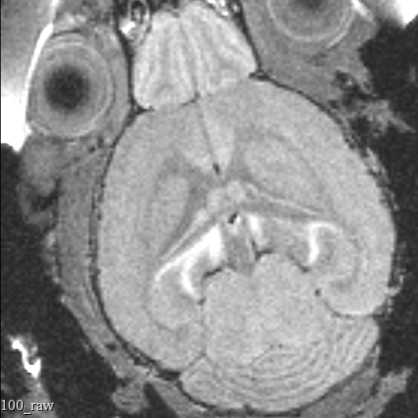
Perform the full 3d scan. For the UW MRI scanner, typical parameters are as follows. Work with your scanner operators to validate that these parameters are correct for your equipment and needs. Your MRI Technician will set these parameters and can load parameters from previous scans.
Parameters:
- Scan Type: RARE (fast spin echo)
- Resolution: 100 µm isotropic
- Number of Averages: 2
- RARE Factor: 4
- Echo Time: 5.333 ms
- Effective TE (time to echo): 10.666 ms
- Repetition Time: 500 ms
Note
The precise parameters of these scans are subject to change. Parameters used will be recorded in the Bruker image files.
1h 30m
Remove mouse from scanner (done by MRI operator) and recover mouse with thermal support. Return the mouse to the transport cage once the mouse begins to ambulate.
Repeat scanning procedure for all mice in a group, sanitizing any surfaces the mouse contacts after each scan.
Transfer the data to a USB drive.
Transport mice back to home vivarium
1h
Transport mice back to home institute and follow IACUC protocols for returning mice.
Transfer data to appropriate storage location.
Protocol references
Massaad, C. A. & Pautler, R. G. Manganese-Enhanced Magnetic Resonance Imaging (MEMRI). Methods Mol Biol 711, 145–174 (2011).