Jun 11, 2026
An Opentrons OT-2 workflow for the Cayman His-tag detection ELISA kit
- 1Arcadia Science
- Arcadia Science



Protocol Citation: Ben Braverman 2026. An Opentrons OT-2 workflow for the Cayman His-tag detection ELISA kit. protocols.io https://dx.doi.org/10.17504/protocols.io.n92ld4x3nl5b/v1
License: This is an open access protocol distributed under the terms of the Creative Commons Attribution License, which permits unrestricted use, distribution, and reproduction in any medium, provided the original author and source are credited
Protocol status: Working
We use this protocol and it's working
Created: April 16, 2026
Last Modified: June 11, 2026
Protocol Integer ID: 315111
Keywords: tag detection elisa kit, channel protocol for plate washing, custom labware definition, printable hardware file, plate map preparing reagent, channel protocol for sample, handling robot, p1000, plate washing, loading protocol loading, substrate, cayman chemical
Abstract
We developed a set of protocols to automate the Cayman His-Tag Detection ELISA Kit (Cayman Chemical, Item No. 10012445) on the Opentrons OT-2 liquid-handling robot. This protocol walks through the entire workflow setup. We cover:
- Generating a plate map
- Preparing reagents
- Loading the OT-2 deck for running the sample-loading protocol
- Loading the OT-2 deck for running the wash and substrate-addition protocol
- Reading the plate and analyzing results
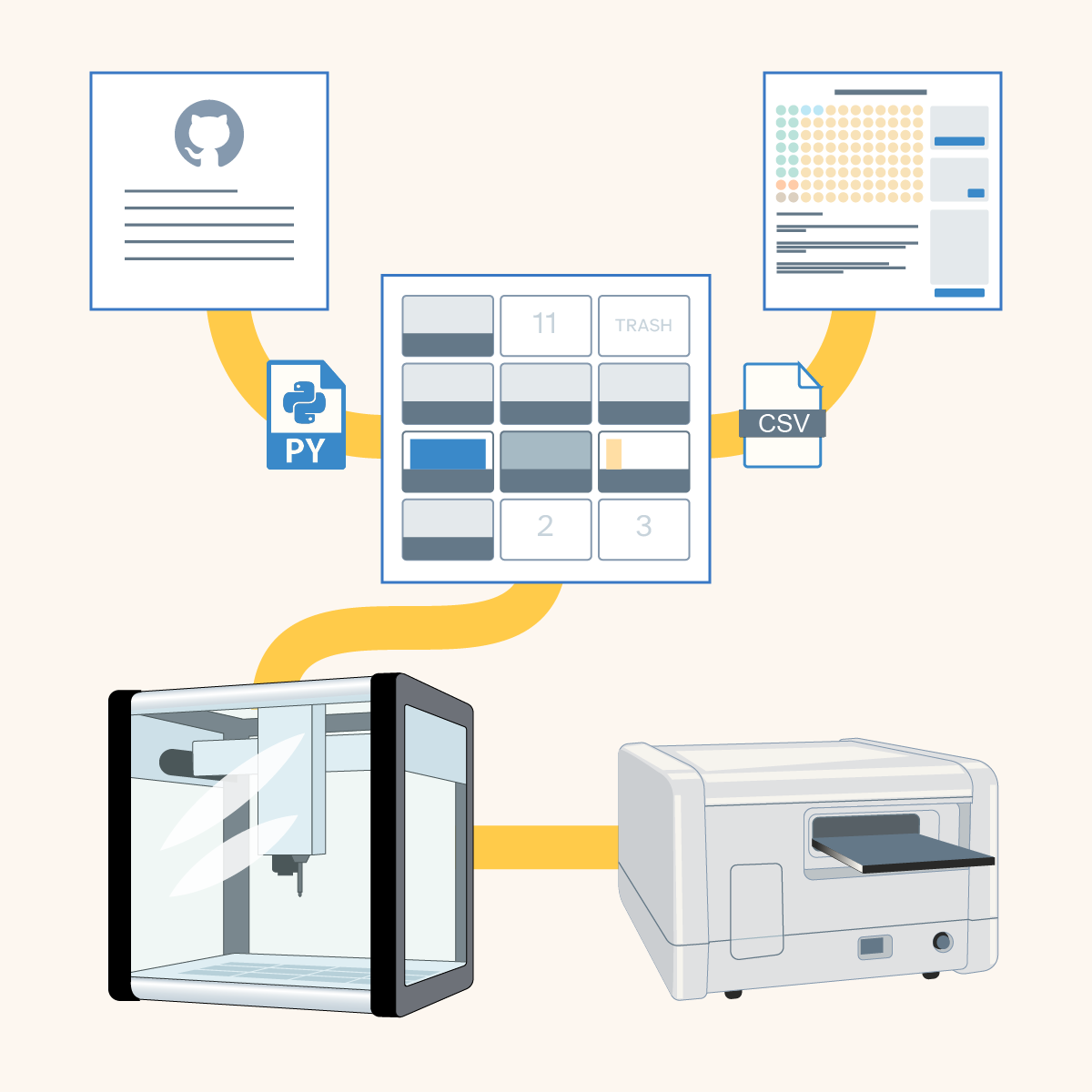
The workflow uses two OT-2 scripts that run sequentially: a P1000 single-channel protocol for sample and reagent loading, and a P300 8-channel protocol for plate washing and substrate addition.
All associated code, custom labware definitions, and 3D-printable hardware files are available in our GitHub repo: https://github.com/Arcadia-Science/cayman-his-elisa-opentrons-workflow
Image Attribution
Arcadia Science
Guidelines
The workflow is split into two sequential OT-2 protocols with a manual incubation step in between. Plan for approximately 3.5 to 4 h of total time: 30 to 60 min for reagent preparation and deck setup, 20 to 40 min for the sample loading protocol to run (varies with sample count), 90 min for incubation, 30 to 45 min for the wash and substrate protocol to run, and 60 to 90 min for substrate development and plate reading.
We recommend doing a dry run of both protocols with "Test Mode" enabled before running your first real experiment. This returns tips to the rack instead of discarding them so you can verify deck setup, tip usage, and liquid handling behavior without consuming reagents or tips.
Three custom labware JSON definitions must be uploaded to the Opentrons app before running the protocols. These are the Cayman ELISA strip plate, the Nalgene 300 mL waste reservoir, and optionally the 3D-printed tip chute. Upload them via "Settings" then "Custom Labware" in the Opentrons app. This only needs to be done once.
The P1000 single-channel pipette must be installed on the left mount and the P300 8-channel pipette on the right mount. If your pipettes are mounted differently, edit the mount assignment in the protocol files before uploading.
All code, custom labware definitions, 3D-printable hardware files, and an example plate map are available at: https://github.com/Arcadia-Science/cayman-his-elisa-opentrons-workflow
Materials
ELISA kit
Cayman His-Tag Detection ELISA Kit (Cayman Chemical, Item No. 10012445), which includes a pre-coated goat anti-mouse IgG 96-well strip plate, His–AP tracer, His ELISA monoclonal antibody, His-tag standard, TBS assay buffer, AP wash buffer concentrate, and pNPP substrate.
Opentrons hardware
Opentrons OT-2 liquid handling robot, P1000 single-channel GEN2 pipette (left mount), P300 8-Channel GEN2 pipette (right mount), Opentrons 96 filter tip racks in 1,000 µL (1–3 racks) and 200 µL (1–5 racks).
Labware
Opentrons 24-well aluminum block with 1.5 mL snap-cap tubes, Opentrons 96-well aluminum block adapter with Bio-Rad 96-well 200 µL PCR plates, NEST 12-channel reservoirs (15 mL), Nalgene 300 mL reservoirs, and 1.5 mL snap-cap tubes for reagents.
Software
Opentrons app and any web browser.
Optional
3D-printed tip chute for high-sample-count runs (STL and labware definition in the repo).
Safety warnings
Refer to the Cayman His-Tag Detection ELISA Kit manual and its associated safety data sheets for reagent-specific hazard information.
Before start
Gather required materials
ELISA kit
Cayman His-Tag Detection ELISA Kit (Cayman Chemical, Item No. 10012445), which includes a pre-coated goat anti-mouse IgG 96-well strip plate, His–AP tracer, His ELISA monoclonal antibody, His-tag standard, TBS assay buffer, AP wash buffer concentrate, and pNPP substrate.
Opentrons hardware
Opentrons OT-2 liquid handling robot, P1000 Single-channel GEN2 pipette (left mount), P300 8-channel GEN2 pipette (right mount), Opentrons 96 filter tip racks in 1,000 µL (1–3 racks) and 200 µL (1–5 racks).
Labware
Opentrons 24-well aluminum block with NEST 1.5 mL snap-cap tubes, Opentrons 96-well aluminum block adapter with Bio-Rad 96-well 200 µL PCR plate, two NEST 12-channel reservoirs (15 mL), Nalgene 300 mL reservoir, and 1.5 mL snap-cap tubes for reagents.
Software
Opentrons App (tested with Python API level 2.20) and any web browser.
Optional
3D-printed tip chute for high-sample-count runs (STL and labware definition in the repo).
Install custom labware
Three custom labware definitions must be uploaded to the Opentrons app before running the protocols. These JSON files are in the...
custom_labware/
... directory of the GitHub repository.
Open the Opentrons app and navigate to "Settings" → "Custom Labware." Upload each of the following:
caymanelisastripplate_96_wellplate_360ul.json
(Cayman ELISA strip plate)
nalgene_1_reservoir_300ml.json
(Nalgene 300 mL waste reservoir)
3dprintedtipchute_1_reservoir_15000ul.json
(3D-printed tip chute; only if using the waste-chute variant)
You only need to do this once; the definitions persist across sessions. Pre-chill the aluminum blocks: Place the Opentrons 24-well aluminum block and the 96-well aluminum block adapter in a −20 °C freezer for at least 2 h before starting.
Generate a plate map
Open...
tools/ELISA_platemap_generator_final.html
No installation or dependencies are required. This tool produces a CSV file that tells the OT-2 sample-loading script where to dispense each reagent and sample.
A screenshot of the ELISA plate map generator interface.
Auto-fill samples
Use the "Auto-Fill Samples" panel on the right side of the page:
- Set the number of "Replicates" (e.g., 2).
- Set the "# of Samples."
- Choose the "Orientation" — Horizontal (replicates side by side across columns) or Vertical (replicates stacked down rows).
- Click "Fill Samples."
The generator assigns sequential numbers (1, 2, 3…) to wells. These numbers correspond to positions on your sample source plate in row-major order: A1 = sample 1, A2 = sample 2, … A12 = sample 12, B1 = sample 13, and so on.
Assign standards and controls
Select wells on the plate grid (click individual wells, or click-and-drag to select a range), then assign a type using the "Assign Content" panel:
- S1–S6 — Standards. Enter the standard number (1–6) and click "Assign." These correspond to the six-point dilution series in the kit manual (3 µg/mL down to 0.093 µg/mL). Typically run in duplicate.
- B0 — Maximum binding control. Receives TBS buffer + tracer + antibody, but no sample. Typically run in duplicate.
- NSB — Non-specific binding control. Receives TBS buffer + tracer only. No antibody or sample. Typically run in duplicate.
- Blk — Blank. Receives no reagents during sample loading; only receives pNPP substrate during development. Typically run in duplicate.
You can also type directly into any selected well using the keyboard.
Add sample IDs (optional)
In the "Sample Key" panel, map sample numbers to descriptive IDs. You can paste a list of IDs (one per line) and click "Apply Bulk IDs." These are saved in the CSV for your records, but aren't used by the OT-2 scripts.
Download the CSV
Click "Download CSV." You'll upload this file to the Opentrons app in step #3.
Prepare reagents
Prepare all kit reagents according to the Cayman His-Tag Detection ELISA Kit manual before loading the OT-2 deck.
Pre-chill the aluminum blocks
Put the Opentrons 24-well aluminum block and the 96-well aluminum block adapter in a −20 °C freezer for at least 2 h before starting.
Prepare the TBS assay buffer
Dilute the vial of TBS assay buffer 10× concentrate with 90 mL of UltraPure water, as per the kit manual. Aliquot at least 1,000 µL of TBS assay buffer into a 1.5 mL snap-cap tube.
Prepare the standard dilution series
Prepare standards S1–S6 by serially diluting with TBS assay buffer, as per the kit manual. Load each standard into a 1.5 mL snap-cap tube with at least 1,000 µL.
Prepare the His–AP tracer
Resuspend the His-AP tracer vial with 6 mL TBS assay buffer, as per the kit manual. Aliquot 1,300 µL of prepared His–AP tracer into each of the required number of 1.5 mL tubes. Each tube provides 1,000 µL of usable volume with a 300 µL dead volume. Plan for approximately one tube per 20 wells that receive tracer (all wells except Blk). Do NOT exceed 1,300 µL, as you'll risk overflowing the tube.
Prepare the His ELISA monoclonal antibody
Resuspend the His ELISA monoclonal antibody vial with 6 mL TBS assay buffer, as per the kit manual. Aliquot 1,300 µL of prepared antibody into the required number of 1.5 mL tubes. Plan for approximately one tube per 20 wells that receive antibody (all wells except NSB and Blk).
Prepare samples
Load each sample into the Bio-Rad 96-well PCR plate in row-major order matching the sample numbers in your plate map (sample 1 → A1, sample 2 → A2, … sample 13 → B1, etc.). Each replicate requires 50 µL. Total volume per well should not exceed 125 µL to prevent overflow from pipette tip displacement.
A diagram showing sample-loading order in the 96-well plate.
Prepare the AP wash buffer
Dilute the AP wash buffer concentrate 1:150, as per the kit manual. You'll need 11 mL of prepared wash buffer per plate column used in your experiment. For example, if your plate map uses five columns, prepare at least 55 mL of wash buffer. We recommend preparing extra to account for dead volume in the reservoir channels. The prepared wash buffer is used during the wash and substrate-addition script in step #4 ( ) and can be stored at 4 °C if prepared in advance.
Prepare the pNPP substrate
Thaw the pNPP substrate on ice and store at 4 °C until it's needed. You'll need approximately 2 mL of pNPP per column being washed. The total volume to load into the 12-channel reservoir is calculated in the script. The wash and substrate-addition script in step #4 ( ) includes a built-in pause after the wash steps specifically so that you can prepare and load the substrate at that point rather than at the start of the run. This minimizes the substrate's exposure to light and room temperature.
Load the OT-2 deck and run the sample-loading script
The sample-loading script dispenses TBS buffer, standards, samples, His–AP tracer, and monoclonal antibody into the Cayman ELISA strip plate according to your plate map. It uses the P1000 single-channel pipette on the left mount.
Upload the script and plate map
Import...
scripts/ot2_p1000single_elisa_sample_filling_final.py
... into the Opentrons App.
- Upload the CSV plate map via the "Plate Layout CSV" parameter.
- Set "Test Mode" to "true" for dry runs or "false" for actual experiments.
- Review the deck layout in the app and confirm that tip rack count and reagent volumes match your preparation.
Set up the deck
Place all labware in the appropriate positions on the deck according to the map view in the OT-2 "Labware & Liquids" section.
Photo of labware placed appropriately on the OT-2 deck for sample loading.
Screenshot of the Opentrons app with correctly designated labware positions for sample loading.
Screenshot of the Opentrons app showing locations of the 1.5mL reagent tubes on the 24-well aluminum block.
Note
The number of tubes and tip racks changes depending on how many samples you're running.
Make sure to turn caps of 1.5 mL tubes toward the outside of the block to prevent interference with neighboring tubes.
Run the script
The script executes five steps in order, using a new tip for every transfer:
- TBS buffer → NSB wells (100 µL each) and B0 wells (50 µL each), aspirated from B1
- Standards S1–S6 → Assigned wells (50 µL each), aspirated from A1–A6
- Samples → Assigned wells (50 µL each), aspirated from the Bio-Rad PCR plate
- His–AP tracer → All occupied wells except Blk (50 µL each), aspirated from tracer tubes
- His ELISA monoclonal antibody → All occupied wells except NSB and Blk (50 µL each), aspirated from antibody tubes
All transfers dispense 1 mm above the bottom of the well at 20% of the default pipette speed.
Incubate
After the script finishes:
- Remove the ELISA strip plate from the OT-2 deck.
- Seal the plate with adhesive film.
- Place on an orbital shaker and incubate for 90 min at room temperature with gentle agitation, as described in the Cayman kit manual.
Note
For high-sample-count experiments where the default trash bin would overflow with P1000 tips, use the waste chute variant: protocols/ot2_p1000single_elisa_sample_filling_waste_chute.py. This drops tips into a 3D-printed chute at slot 10. Run tests/ot2_tip_drop_waste_chute_test.py first to validate chute positioning.
Load the OT-2 deck and run the wash and substrate-addition script
The wash and substrate-addition script removes supernatant, performs six wash cycles with AP wash buffer, and adds pNPP substrate. It uses the P300 8-channel pipette on the right mount.
Upload the script and configure parameters
Import...
scripts/ot2_p300multi_elisa_wash_substrate.py
... into the Opentrons app.
- Set "Number of Columns" to match the number of columns used in your plate map (1–12, counting from the left).
- Set "Test Mode" as desired.
Set up the deck
Place all labware in the appropriate positions on the deck according to the map view in the Labware & Liquids section of the OT-2 interface.
Photo of labware placed appropriately on the OT-2 deck for the wash and substrate-addition protocol.
Screenshot of the OT-2 app with correctly designated labware positions for wash and substrate addition.
Fill the wash buffer reservoir (slot 4)
Fill the NEST 12-channel reservoir with 11 mL of prepared AP wash buffer per channel, one channel per plate column used. For example, if your plate map uses columns 1–5, fill channels 1–5 with 11 mL each.
Run the script
The script executes the following steps at 50% of the default pipette speed:
Supernatant removal
Aspirates 195 µL from each column (0.8 mm above well bottom) and dispenses into the waste reservoir. 5 µL are left for the airgap to prevent dripping. Fresh tips are used per column.
Six wash cycles
Each cycle fills every column with 195 µL of AP wash buffer (dispensed from 3.5 mm below the top of the well), then empties each column by aspirating 195 µL into the waste reservoir. Each plate column draws from its own dedicated wash buffer channel (column 1 from channel 1, column 2 from channel 2, etc.). Tips are reused across all six cycles to reduce waste.
Pause for substrate loading
After washing, the script pauses and displays a message. At this point:
- Load pNPP substrate into channels 1 and 2 of the NEST reservoir in slot 6.
- Press "Resume" in the Opentrons app.
Note
pNPP substrate is loaded at this point rather than at the start of the script to minimize its exposure to light and temperature, limiting variability in signal development.
Substrate addition
Dispenses 200 µL of pNPP substrate into each column from the top of the well using fresh tips. The script automatically switches from channel 1 to channel 2 when the first is depleted.
After the script finishes, remove the plate from the OT-2, seal it, and incubate for approximately 60 min at room temperature protected from light.
Read the plate and analyze results
Read the plate on a plate reader at 405–420 nm absorbance. We recommend reading at 415 nm every 10 min for 90 min to capture the colorimetric response at the time point with the best signal-to-noise ratio.
Data analysis overview
Raw absorbance values must be corrected using the on-plate controls before estimating sample concentrations, as follows:
Blank correction
Subtract the mean Blk well absorbance from all other wells to remove the substrate background signal.
Calculate corrected B0
The corrected maximum binding isolates the signal from specific antibody–tracer binding at full capacity:
Corrected B0 = mean(B0) − mean(NSB)
Calculate %B/B0
For each standard and sample well, normalize the signal as a percentage of maximum binding:
%B/B0 = (Well − NSB) / (B0 − NSB) × 100
Because this is a competitive assay, wells with more free His-tagged protein have less tracer bound and a lower %B/B0.
Fit the standard curve
Plot %B/B0 (linear y-axis) against His-protein concentration (log x-axis) for standards S1–S6. Fit a four-parameter logistic (4PL) model:
y = D + (A − D) / [1 + (x / C)B]
where A is the upper asymptote, D is the lower asymptote, C is the IC50, and B is the Hill slope.
Estimate sample concentrations
Solve the inverse 4PL function for each sample:
x = C × [((A − D) / (y − D)) − 1](1 / B)
If the sample was diluted before loading, multiply by the dilution factor.
Note
Samples with %B/B0 above 80% or below 20% fall outside the reliable range of the standard curve and should be re-assayed at a different dilution. A disparity of 20% or more between concentrations estimated from two dilutions of the same sample indicates matrix interference. Because immunoreactivity varies with tag accessibility, the standard curve should be treated as a semi-quantitative reference for comparing relative protein levels across samples rather than an absolute quantification tool.